oracledna
This post demonstrated the migration of Oracle GoldenGate Classic Architecture to Oracle GoldenGate Microservices Architecture using the Oracle GoldenGate Migration Utility.
The migration process included the conversion of Classic Architecture components such as Extract, Data Pump, trail files, checkpoints, and configuration settings into their Microservices Architecture equivalents. During the migration, the Extract process was migrated to the Administration Service, the Data Pump was converted into a Distribution Path within the Distribution Service.
Environment
==========
Classic Architecture Version: 19.31
MicroServices Architecture Version: 19.31
Classic Architecture: /app/ogg19c
MicroServices Architecture: /app/ogg19cma
Migration Utility Restrictions
=====================
1. Classic Extract processes are not supported in Microservices Architecture deployments later than version 19.1.
2. Pump Extract processes that use the DBLOGIN parameter are not supported.
3. Pump Extract processes performing data transformations are not supported.
4. Pump Extract processes configured to write to multiple trail files are not supported.
5. The parameters MACRO, OBEY, and MACROCHAR are not supported in Microservices Architecture.
6. The INCLUDE parameter is supported only for Extract and Replicat processes and is not supported for Pump Extract processes.
Note: The minimum supported version of MicroService is 19.1.0.0.200714
1. Stop all the processes of Classic Architecture.
GGSCI (oggsrc) 10> stop *
Sending STOP request to EXTRACT EXTSRC1 …
Request processed.
Sending STOP request to EXTRACT PMPSRC1 …
Request processed.
GGSCI (oggsrc) 11> stop mgr
Manager process is required by other GGS processes.
Are you sure you want to stop it (y/n)?y
Sending STOP request to MANAGER …
Request processed.
Manager stopped.
GGSCI (oggsrc) 12> info all
Program Status Group Lag at Chkpt Time Since Chkpt
MANAGER STOPPED
EXTRACT STOPPED EXTSRC1 00:00:00 00:00:15
EXTRACT STOPPED PMPSRC1 00:00:00 00:00:15
2. Unzip the Migration Utility ZIP file.
[oracle@oggsrc oracle]$ unzip p37274898_234000_Linux-x86-64.zip
Archive: p37274898_234000_Linux-x86-64.zip
inflating: GoldenGateMigrationUtilityOverview.pdf
inflating: GoldenGateMigrationUtilityUserGuide.pdf
inflating: ogg-migration-package-23.26.2.0.4.jar
inflating: README.txt
inflating: WhyGoldenGateMicroservices.pdf
[oracle@oggsrc oracle]$ ls -lrt
total 36836
-rw-r–r–. 1 oracle oinstall 10673066 Nov 7 10:31 ogg-migration-package-23.26.2.0.4.jar
-rw-r–r–. 1 oracle oinstall 592682 Nov 7 10:35 WhyGoldenGateMicroservices.pdf
-rw-r–r–. 1 oracle oinstall 2559 Nov 7 10:35 README.txt
-rw-r–r–. 1 oracle oinstall 253794 Nov 7 10:35 GoldenGateMigrationUtilityOverview.pdf
-rw-r–r–. 1 oracle oinstall 7841975 Nov 7 10:45 GoldenGateMigrationUtilityUserGuide.pdf
-rw-r–r–. 1 oracle oinstall 18346981 Nov 16 17:17 p37274898_234000_Linux-x86-64.zip
3. Add credentials in MicroServices deployment
The required credentials must be manually migrated to the target Microservices deployment before proceeding with the migration.
–Navigate to OGG MA home
[oracle@oggsrc ~]$ cd /app/ogg19cma/bin/
–Connect to deployment1
[oracle@oggsrc bin]$ ./adminclient
OGG (not connected) 1> CONNECT http://192.168.56.172:7000 AS oggadmin PASSWORD oracle
Using default deployment ‘Depolyment1’
OGG (http://192.168.56.172:7000 Depolyment1) 3> ALTER CREDENTIALSTORE ADD USER c##ggadmin@GGSRC PASSWORD ggadmin ALIAS ggadmin
2026-11-17T14:13:53Z INFO OGG-15116 No information found in credential store.
2026-11-17T14:13:53Z INFO OGG-15114 Credential store altered.
OGG (http://192.168.56.172:7000 Depolyment1) 4> INFO CREDENTIALSTORE
Default domain: OracleGoldenGate
Alias: ggadmin
Userid: c##ggadmin@GGSRC
OGG (http://192.168.56.172:7000 Depolyment1) 5>
4. Run dry run of an Oracle GoldenGate Classic Architecture migration assessment.
This step does not make any changes to the existing GoldenGate deployment. Ensure that Service Manager is running on the host.
–Navigate to the Migration Utility location
[oracle@oggsrc ~]$ cd /misc/oracle/
–Run dry run
[oracle@oggsrc oracle]$ java -jar ogg-migration-package-23.26.2.0.4.jar -classicHome /app/ogg19c -debug -dryrun
************************************************************************************
** Oracle GoldenGate Classic to Microservices Migration Utility **
** Version 23.26.2.0.4 Build 145 at Thu Nov 05 19:51:49 UTC 2026 **
** **
** Copyright (C) 1995, 2026, Oracle and/or its affiliates. All rights reserved. **
** **
** Operating system character set identified as UTF-8. **
************************************************************************************
Command Entered: -classicHome /app/ogg19c -debug -dryrun
Log File for this session is /misc/oracle/./Migration111726194806.log.
Debug Mode is Enabled.
Simulation Mode (Dry Run) is Enabled. No Actual Migrations will Occur.
Service Manager Detected at http://127.0.0.1:7000.
Use Scanned URI for Service Manager? Press Enter to Accept or type Alternate URI:>http://192.168.56.172:7000
Enter Service Manager Credentials:
User Id:–> oggadmin
Password:->
Scanning for Microservices Deployments…
Using Deployment Depolyment1 [f686b11b-8a39-4772-a161-d1115d323c83]
The following processes will be migrated to deployment Depolyment1:
Extracts:
EXTSRC1
Pumps:
PMPSRC1
Do you wish to continue? (yes/no):> yes
IMPORTANT: credentials must be manually migrated to the target microservices deployment prior to migration.
Validating required ogg credentials on the target deployment.
Migrating trails to $OGG_DATA_HOME (/app/ogg19cma/deploy1/var/lib/data).
Scanning for trails eligible for migration.
Found 1 trail(s) eligible for migration:
$OGG_CLASSIC_HOME/dirdat/es => $OGG_DATA_HOME/es
Copying 5 file(s) totaling 7,483 byte(s)…
100% —-+—-+—-+—-+—-+—-+—-+—-+—-+—-+
Trail migration summary:
Files copied ……: 5 files(s) totaling 7,483 byte(s) were successfully copied.
Files not copied ..: 0 files(s) totaling 0 byte(s) could not be copied due to errors.
Files skipped …..: 0 files(s) totaling 0 byte(s) already existed and were not overwritten.
Migration of trails was successful.
Do you wish to migrate your GLOBALS parameters? (yes/no):> yes
The Merge of GLOBALS has the following Issues:
Classic GLOBALS file does not exist, GLOBALS will not be merged.
Do you wish to continue migrating your GLOBALS parameters? (yes/no):> yes
GLOBALS parameters successfully migrated, 0 parameters were merged.
Migrating EXTRACT EXTSRC1 to http://192.168.56.172:7001.
Checkpoint File(s) Copied and Converted Successfully.
WARNING: Parameter File for EXTSRC1 contains SETENV parameters.
Please inspect all SETENV Parameters to ensure that they are valid in the microservices deployment.
For SETENV Parameter (ORACLE_HOME = ‘/u01/app/oracle/product/19c/db’), Specify (k)eep, (m)odify or (d)elete:>k
SETENV parameter ORACLE_HOME kept.
For SETENV Parameter (TNS_ADMIN = ‘/u01/app/oracle/product/19c/db/network/admin’), Specify (k)eep, (m)odify or (d)elete:>k
SETENV parameter TNS_ADMIN kept.
Parameter File extsrc1.prm Saved Successfully.
EXTRACT EXTSRC1 patched.
Migration of Extract EXTSRC1 Completed Successfully.
Migrating PUMP PMPSRC1 to http://192.168.56.172:7002.
Use Default Pump Target URI of ogg://oggtgt:7809/services/v2/targets?trail=/app/ogg19c/dirdat/es? Press Enter to Accept or type Alternate URI:>
Creating Distribution Path for Pump PMPSRC1.
Distribution Path Created Successfully. Setting trail sequence to 4 with an RBA of 1375.
Migration of Pump PMPSRC1 Completed Successfully.
Migrating Manager tasks to http://192.168.56.172:7001.
No tasks to migrate.
Migration of Manager Tasks Completed Successfully.
Migration Summary
Migration of Extract EXTSRC1 …..: Successful
Migration of Pump PMPSRC1 ……..: Successful
Migration of Trail es …………: Successful
Migration of GLOBALS ………….: Successful with Warnings
Wallet Migration ……………..: Not Attempted
Migration Simulation (Dry Run) Complete, 3 process(es) would have migrated successfully, 0 process(es) would have failed to migrate.
5. Run the actual migration.
[oracle@oggsrc oracle]$ java -jar ogg-migration-package-23.26.2.0.4.jar -classicHome /app/ogg19c
************************************************************************************
** Oracle GoldenGate Classic to Microservices Migration Utility **
** Version 23.26.2.0.4 Build 145 at Thu Nov 05 19:51:49 UTC 2026 **
** **
** Copyright (C) 1995, 2026, Oracle and/or its affiliates. All rights reserved. **
** **
** Operating system character set identified as UTF-8. **
************************************************************************************
Command Entered: -classicHome /app/ogg19c
Log File for this session is /misc/oracle/./Migration111726195355.log.
Service Manager Detected at http://127.0.0.1:7000.
Use Scanned URI for Service Manager? Press Enter to Accept or type Alternate URI:>http://192.168.56.172:7000
Enter Service Manager Credentials:
User Id:–> oggadmin
Password:->
Scanning for Microservices Deployments…
Using Deployment Depolyment1 [f686b11b-8a39-4772-a161-d1115d323c83]
The following processes will be migrated to deployment Depolyment1:
Extracts:
EXTSRC1
Pumps:
PMPSRC1
Do you wish to continue? (yes/no):> yes
IMPORTANT: credentials must be manually migrated to the target microservices deployment prior to migration.
Validating required ogg credentials on the target deployment.
Migrating trails to $OGG_DATA_HOME (/app/ogg19cma/deploy1/var/lib/data).
Scanning for trails eligible for migration.
Found 1 trail(s) eligible for migration:
$OGG_CLASSIC_HOME/dirdat/es => $OGG_DATA_HOME/es
Copying 5 file(s) totaling 7,483 byte(s)…
100% —-+—-+—-+—-+—-+—-+—-+—-+—-+—-+
Trail migration summary:
Files copied ……: 5 files(s) totaling 7,483 byte(s) were successfully copied.
Files not copied ..: 0 files(s) totaling 0 byte(s) could not be copied due to errors.
Files skipped …..: 0 files(s) totaling 0 byte(s) already existed and were not overwritten.
Migration of trails was successful.
Do you wish to migrate your GLOBALS parameters? (yes/no):> yes
The Merge of GLOBALS has the following Issues:
Classic GLOBALS file does not exist, GLOBALS will not be merged.
Do you wish to continue migrating your GLOBALS parameters? (yes/no):> yes
GLOBALS parameters successfully migrated, 0 parameters were merged.
Migrating EXTRACT EXTSRC1 to http://192.168.56.172:7001.
Checkpoint File(s) Copied and Converted Successfully.
WARNING: Parameter File for EXTSRC1 contains SETENV parameters.
Please inspect all SETENV Parameters to ensure that they are valid in the microservices deployment.
For SETENV Parameter (ORACLE_HOME = ‘/u01/app/oracle/product/19c/db’), Specify (k)eep, (m)odify or (d)elete:>k
SETENV parameter ORACLE_HOME kept.
For SETENV Parameter (TNS_ADMIN = ‘/u01/app/oracle/product/19c/db/network/admin’), Specify (k)eep, (m)odify or (d)elete:>k
SETENV parameter TNS_ADMIN kept.
Parameter File extsrc1.prm Saved Successfully.
EXTRACT EXTSRC1 patched.
Migration of Extract EXTSRC1 Completed Successfully.
Migrating PUMP PMPSRC1 to http://192.168.56.172:7002.
Use Default Pump Target URI of ogg://oggtgt:7809/services/v2/targets?trail=/app/ogg19c/dirdat/es? Press Enter to Accept or type Alternate URI:>
Creating Distribution Path for Pump PMPSRC1.
Distribution Path Created Successfully. Setting trail sequence to 4 with an RBA of 1375.
Migration of Pump PMPSRC1 Completed Successfully.
Migrating Manager tasks to http://192.168.56.172:7001.
No tasks to migrate.
Migration of Manager Tasks Completed Successfully.
Migration Summary
Migration of Extract EXTSRC1 …..: Successful
Migration of Pump PMPSRC1 ……..: Successful
Migration of Trail es …………: Successful
Migration of GLOBALS ………….: Successful with Warnings
Wallet Migration ……………..: Not Attempted
Migration Processing Complete, 3 process were migrated successfully.
6. Verify the processess of Classic and MicroService Architecture.
–Verify the processess of Classic Architecture
[oracle@oggsrc ~]$ cd /app/ogg19c
[oracle@oggsrc ogg19c]$ ./ggsci
GGSCI (oggsrc) 1> info all
Program Status Group Lag at Chkpt Time Since Chkpt
MANAGER STOPPED
The all processes were removed from Classic GoldenGate Home.
–Verify the processess of MicroService Architecture
[oracle@oggsrc ~]$ cd /app/ogg19cma/bin/
[oracle@oggsrc bin]$ ./adminclient
OGG (http://192.168.56.172:7000 Depolyment1) 5> info all
Program Status Group Type Lag at Chkpt Time Since Chkpt
ADMINSRVR RUNNING
DISTSRVR RUNNING
PMSRVR RUNNING
RECVSRVR RUNNING
EXTRACT STOPPED EXTSRC1 INTEGRATED 00:00:00 00:47:56
–Start the extract EXTSRC1
OGG (http://192.168.56.172:7000 Depolyment1) 6> start EXTSRC1
2026-11-17T14:41:13Z INFO OGG-00975 EXTRACT EXTSRC1 starting
2026-11-17T14:41:13Z INFO OGG-15426 EXTRACT EXTSRC1 started
OGG (http://192.168.56.172:7000 Depolyment1) 7> info all
Program Status Group Type Lag at Chkpt Time Since Chkpt
ADMINSRVR RUNNING
DISTSRVR RUNNING
PMSRVR RUNNING
RECVSRVR RUNNING
EXTRACT RUNNING EXTSRC1 INTEGRATED 00:00:00 00:48:32
The Pump PMPSRC1 was converted into a Distribution Path, so it will not appear under info all.
OGG (http://192.168.56.172:7000 Depolyment1) 8> INFO DISTPATH ALL
DistPathFromPMPSRC1 running
7. Start the distrubution path of Distrubution server and check the replication.
Start the distrubution path of Distrubution server.
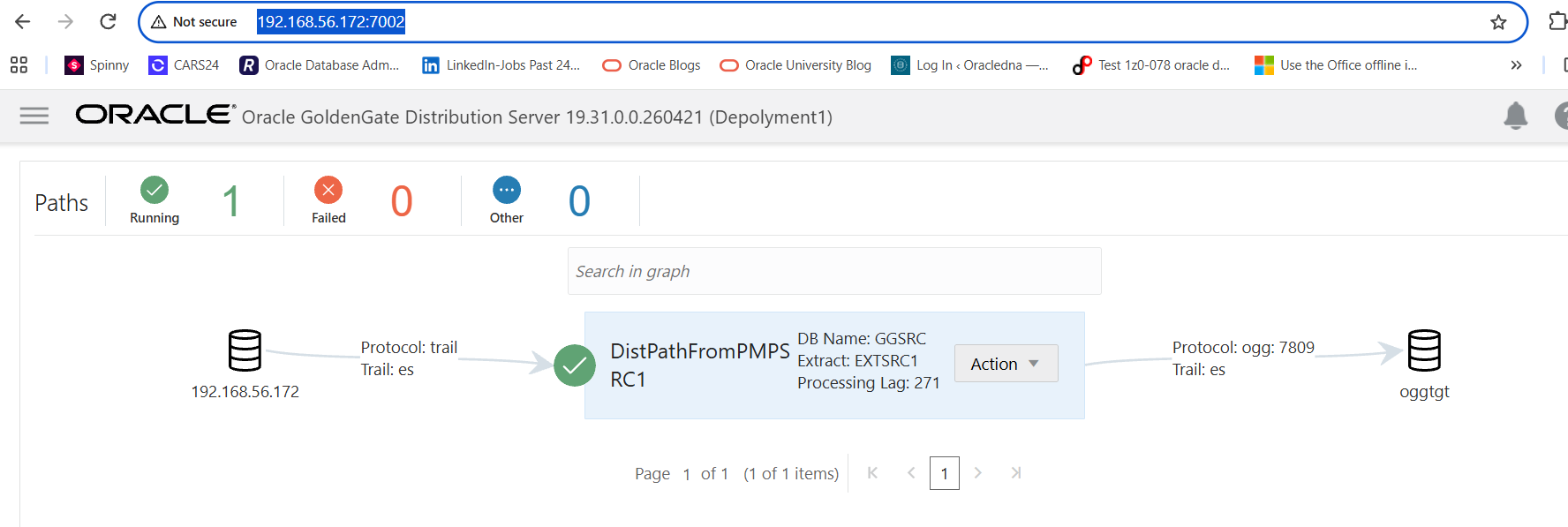
Insert record in source table and check the target table whether data is replicated or not.
–On source Table
SQL> conn hr/hr@GGSRCPDB1
Connected.
SQL> select * from test;
ID NAME
———- ———-
1 ABC
2 XYZ
SQL> insert into test(id,name) values(3,’DEF’);
1 row created.
SQL> commit;
Commit complete.
SQL> select * from test;
ID NAME
———- ———-
1 ABC
2 XYZ
3 DEF
–On target table
SQL> alter session set container=GGTGTPDB1;
Session altered.
SQL> select * from hr.test;
ID NAME
———- ———-
3 DEF
2 XYZ
1 ABC
The Oracle GoldenGate Classic Architecture has been successfully migrated to the Microservices Architecture.
Disclaimer:
Please note the above information is only for educational purpose and practised in personal test database only. Always test in test database before implementing in production database. The pre-requisites and ways of implementing may vary from one environment to another. Hence, not providing guarantee that it will work in your environment.