 oracledna
This post demonstartedsthe installation of Oracle Enterprise Manager Cloud Control 13.5.0.0 (13.5) on Oracle Linux 9.4.
The installation mode is Advanced Installation (SMALL).
Oracle Enterprise Manager Cloud Control (OEMCC) is Oracle’s flagship IT management platform, designed to monitor, manage, and optimize databases and middleware, applications from a single console.
1. Hardware requirements for Advanced Installation (SMALL)
Below are the hardware requirements for Oracle Management Service
CPU Cores/Host – 4
RAM – 10 GB
Hard Disk Space (With Oracle Software Library and JVMD Engine) – 28 GB
Temporary Directory Hard Disk Space – 1.7 GB
Below are the hardware requirements for Oracle Management Agent
CPU Cores/Host – 2
Agent Base Directory Space – 1.5 GB
Swap Space – 500 MB
Temporary Directory Hard Disk Space – 1 GB
Stage/Working Directory Space – 750 GB
Below are the hardware requirements for Oracle Management Repository Database
CPU Cores/Host – 4
RAM – 7 GB
Hard Disk Space (SYSTEM: 600MB, MGMT_TABLESPACE: 100 GB,MGMT_ECM_DEPOT_TS: 1 GB,MGMT_AD4J_TS:10 GB, TEMP 10GB, ARCHIVELOG AREA: 25GB) – 147 GB
2. Package and Kernel ParameterRequirements for Enterprise Manager Cloud Control.
+++Package Requirements for Oracle Management Service+++
Oracle Linux 9 and Red Hat Linux 9
• binutils-2.35.2-17.0.1.el9
• gcc-11.2.1-9.4.0.2.el9
• gcc-c++-11.2.1-9.4.0.2.el9
• glibc-2.34-28.0.1.el9_0.2.x86_64
• glibc-devel-2.34-28.0.1.el9_0.2.x86_64
• libaio-0.3.111-13.el9.x86_64
• libgcc-11.2.1-9.4.0.2.el9.x86_64
• libnsl-2.34-83.0.2.el9.x86_64
• libstdc++-11.2.1-9.4.0.2.el9.x86_64
• libstdc++-devel-11.2.1-9.4.0.2.el9.x86_64
• make-4.3-8.el9
• motif-2.3.4-25.el9.x86_64
• motif-devel-2.3.4-25.el9.x86_64
• openssl-3.0.1-41.0.1.el9_0
• sysstat-12.5.4-3.el9
Oracle Linux 8 and Red Hat Linux 8
• binutils-2.30-49.0.2.el8
• gcc-8.2.1-3.5.0.1.el8
• gcc-c++-8.2.1-3.5.0.1.el8
• glibc-2.28-42.0.1.el8.x86_64
• glibc-devel-2.28-42.0.1.el8.x86_64
• glibc-devel-2.17-55-i686
• libaio-0.3.110-12.el8.x86_64
• libaio-devel-0.3.110-12.el8.x86_64
• libgcc-8.2.1-3.5.0.1.el8.x86_64
• libstdc++-8.2.1-3.5.0.1.el8.x86_64
• libstdc++-devel-8.2.1-3.5.0.1.el8.x86_64
• libnsl.x86_64
• sysstat-11.7.3-2.el8
• motif-2.3.4-16.el8.x86_64
• motif-devel-2.3.4-16.el8.x86_64
• redhat-lsb-4.1-47.0.1.el8.x86_64
• redhat-lsb-core-4.1-47.0.1.el8.x86_64
• openssl-1.1.1-8.0.1.el8
• make-4.2.1-9.el8
+++Package Requirements for Oracle Management Agent+++
Oracle Linux 9 and Red Hat Linux 9
• binutils-2.35.2-17.0.1.el9
• glibc-common-2.34-100
• libaio-0.3.111-13.el9.x86_65
• libnsl-2.34-83.0.2.el9.x86_64
• libstdc++-11.2.1-9.4.0.2.el9.x86_64
• make-4.3-8.el9
• sysstat-12.5.4-3.el9
Oracle Linux 8 and Red Hat Linux 8
• binutils-2.30-49.0.2.el8
• glibc-common-2.17-55
• libaio-0.3.110-12.el8.x86_64
• libstdc++-8.2.1-3.5.0.1.el8.x86_64
• libnsl.x86_64
• sysstat-11.7.3-2.el8
• make-4.2.1-9.el8
+++Kernel Parameter Requirements for Oracle Management Service+++
For ip_local_port_range, ensure that the lower range is set to at least 11,000 or higher
vi /etc/sysctl.conf
net.ipv4.ip_local_port_range = 11000 65000
Oracle recommends the minimum nproc value of 4098 (/etc/security/limits.conf) for the user responsible of running the Enterprise Manager software installation.
If you are installing OMS and Management Repository (database) on the same host, which is running on a Linux operating system (32-bit or 64-bit), then set the kernel.shmmax parameter
to a value prescribed in the Oracle Database Installation Guide that is published for the intended database release and platform.
+++Kernel Parameter Requirements forOracle Management Agent+++
There are no kernel parameter requirements for Management Agent.
3. Creating Operating System Groups and Users for Enterprise Manager Cloud Control.
The Oracle Database pre install rpm creates the Oracle user and groups automatically.
4. Create the directories for the Middleware Home, Oracle Management Service and agent.
Oracle Middleware home or Oracle Home (Middleware home or Oracle Home) is the parent directory that has the Oracle WebLogic Server home, the Java Development Kit, the OMS, the Web tier instance files, and other relevant directories and files. This is where the OMS and the Plug-ins are deployed.
mkdir -p /app/em13c/middleware
Oracle Management Service Instance Base Location is a directory outside the Middleware home where the configuration files of the OMS are stored. By default, gc_inst is the Oracle
Management Service Base Location. However, we can choose to use a custom name.
mkdir -p /app/em13c/gc_inst
Agent Base Directory is a directory outside the Oracle Middleware home (or Oracle home), where the Management Agent home is created.
mkdir -p /app/em13c/agent
Agent Home is the subdirectory within the Agent Base Directory where the Management Agent installed.
mkdir -p /app/em13c/agent/agent_13.5.0.0.0
Agent Instance Directory is a subdirectory (agent_inst) within the Agent Base Directory that is created for storing all Management Agent-related configuration files.
mkdir -p /app/em13c/agent/agent_inst
5. Install the respository database for Enterprise Manager Cloud Control.
[oracle@oem db]$ export CV_ASSUME_DISTID=OEL7.8
[oracle@oem db]$ ./runInstaller -applyRU /miss/oracle/19.27/37642901
[oracle@oem db]$ dbca
6. Prerequisites for Installing Enterprise Manager System at Database level.
Modify the belowp parameters by connecting to the database as SYSDBA and running the following:
SQL> alter system set “_allow_insert_with_update_check”=true scope=both;
System altered.
SQL> alter system set session_cached_cursors=200 scope=spfile;
System altered.
SQL> alter system set shared_pool_size=600M scope=spfile;
System altered.
SQL> alter system set processes=600 scope=spfile;
System altered.
SQL> shut immediate;
Database closed.
Database dismounted.
ORACLE instance shut down.
SQL> startup
ORACLE instance started.
Total System Global Area 2986342864 bytes
Fixed Size 8944080 bytes
Variable Size 654311424 bytes
Database Buffers 2315255808 bytes
Redo Buffers 7831552 bytes
Database mounted.
Database opened.
Chek the parameter values updated or not.
SQL> show parameter “_allow_insert_with_update_check”
NAME TYPE VALUE
———————————— ———– ——————————
_allow_insert_with_update_check boolean TRUE
SQL> show parameter session_cached_cursors
NAME TYPE VALUE
———————————— ———– ——————————
session_cached_cursors integer 200
SQL> show parameter shared_pool_size
NAME TYPE VALUE
———————————— ———– ——————————
shared_pool_size big integer 608M
SQL> show parameter processes
NAME TYPE VALUE
———————————— ———– ——————————
aq_tm_processes integer 1
db_writer_processes integer 1
gcs_server_processes integer 0
global_txn_processes integer 1
job_queue_processes integer 60
log_archive_max_processes integer 4
processes integer 600
6. Installing Oracle Enterprise Manager Cloud Control 13c Release 5 (13.5.0.0)
[oracle@oem oem13.5_soft]$ pwd
/miss/oracle/oem13.5_soft
[oracle@oem oem13.5_soft]$ ls -lrt
total 8363828
-rw-r–r–. 1 oracle oinstall 1586801533 May 15 09:27 em13500_linux64.bin
-rw-r–r–. 1 oracle oinstall 1897494675 May 15 09:29 em13500_linux64-2.zip
-rw-r–r–. 1 oracle oinstall 2130750885 May 15 09:37 em13500_linux64-3.zip
-rw-r–r–. 1 oracle oinstall 1454982045 May 15 09:45 em13500_linux64-4.zip
-rw-r–r–. 1 oracle oinstall 1494500710 May 15 09:48 em13500_linux64-5.zip
If your temporary directory does not have this space, then pass the -J-Djava.io.tmpdir parameter and provide an alternative directory where there is 14 GB of space.
./em13500_linux64.bin -J-Djava.io.tmpdir=/miss/oracle/oem_tmp
[oracle@oem oem13.5_soft]$ ./em13500_linux64.bin -J-Djava.io.tmpdir=/miss/oracle/oem_tmp
Launcher log file is /miss/oracle/oem_tmp/OraInstall2026-05-17_03-15-41PM/launcher2026-05-17_03-15-41PM.log.
Extracting the installer . . . . . . . . . . . . . . . . . . . . . . . . . . . . . . . . . . . . . . . . . . . . . . Done
Checking monitor: must be configured to display at least 256 colors. Actual 16777216 Passed
Checking swap space: must be greater than 512 MB. Actual 8191 MB Passed
Checking if this platform requires a 64-bit JVM. Actual 64 Passed (64-bit not required)
Preparing to launch the Oracle Universal Installer from /miss/oracle/oem_tmp/OraInstall2026-05-17_03-15-41PM
ScratchPathValue :/miss/oracle/oem_tmp/OraInstall2026-05-17_03-15-41PM
May 17, 2026 3:16:32 PM org.apache.sshd.common.io.DefaultIoServiceFactoryFactory getIoServiceProvider
INFO: No detected/configured IoServiceFactoryFactory using Nio2ServiceFactoryFactory
……………………………………………………………………………………..
Installation in progress (Sunday, May 17, 2026 3:51:01 PM IST)
98% Done.
Install successful
Linking in progress (Sunday, May 17, 2026 3:51:01 PM IST)
Link successful
Setup in progress (Sunday, May 17, 2026 3:51:01 PM IST)
Setup successful
Saving inventory (Sunday, May 17, 2026 3:51:01 PM IST)
Saving inventory complete
End of install phases.(Sunday, May 17, 2026 3:51:06 PM IST)
……………………………………………………… 42% Done.
……………………………………………………… 85% Done.
……………….
Installation in progress (Sunday, May 17, 2026 3:51:29 PM IST)
98% Done.
Install successful
Linking in progress (Sunday, May 17, 2026 3:51:30 PM IST)
Link successful
Setup in progress (Sunday, May 17, 2026 3:51:30 PM IST)
Setup successful
Saving inventory (Sunday, May 17, 2026 3:51:30 PM IST)
Saving inventory complete
End of install phases.(Sunday, May 17, 2026 3:51:35 PM IST)
……………………………………………………………………………………..
Installation in progress (Sunday, May 17, 2026 3:51:44 PM IST)
98% Done.
Install successful
Linking in progress (Sunday, May 17, 2026 3:51:45 PM IST)
Link successful
Setup in progress (Sunday, May 17, 2026 3:51:45 PM IST)
Setup successful
Saving inventory (Sunday, May 17, 2026 3:51:45 PM IST)
Saving inventory complete
End of install phases.(Sunday, May 17, 2026 3:51:51 PM IST)
……………………………………………………… 21% Done.
……………………………………………………… 42% Done.
……………………………………………………… 63% Done.
……………………………………………………… 84% Done.
……………………………………
Installation in progress (Sunday, May 17, 2026 3:52:49 PM IST)
98% Done.
Install successful
Linking in progress (Sunday, May 17, 2026 3:52:50 PM IST)
Link successful
Setup in progress (Sunday, May 17, 2026 3:52:50 PM IST)
Setup successful
Saving inventory (Sunday, May 17, 2026 3:52:50 PM IST)
Saving inventory complete
End of install phases.(Sunday, May 17, 2026 3:52:54 PM IST)
……………………………………………………… 48% Done.
……………………………………………………… 96% Done.
..
Installation in progress (Sunday, May 17, 2026 3:53:55 PM IST)
98% Done.
Install successful
Linking in progress (Sunday, May 17, 2026 3:53:56 PM IST)
Link successful
Setup in progress (Sunday, May 17, 2026 3:53:56 PM IST)
Setup successful
Saving inventory (Sunday, May 17, 2026 3:53:56 PM IST)
Saving inventory complete
End of install phases.(Sunday, May 17, 2026 3:54:01 PM IST)
Installing agent plugins if not upgrade
……………………………………………………………………………………..
Installation in progress (Sunday, May 17, 2026 3:54:07 PM IST)
98% Done.
Install successful
Linking in progress (Sunday, May 17, 2026 3:54:07 PM IST)
Link successful
Setup in progress (Sunday, May 17, 2026 3:54:07 PM IST)
Setup successful
Saving inventory (Sunday, May 17, 2026 3:54:07 PM IST)
Saving inventory complete
End of install phases.(Sunday, May 17, 2026 3:54:12 PM IST)
………………………………………………………………………….
Installation in progress (Sunday, May 17, 2026 3:54:14 PM IST)
85% Done.
Install successful
Linking in progress (Sunday, May 17, 2026 3:54:15 PM IST)
Link successful
Setup in progress (Sunday, May 17, 2026 3:54:15 PM IST)
Setup successful
Saving inventory (Sunday, May 17, 2026 3:54:15 PM IST)
Saving inventory complete
End of install phases.(Sunday, May 17, 2026 3:54:20 PM IST)
………………………………………………………………………………..
Installation in progress (Sunday, May 17, 2026 3:54:22 PM IST)
92% Done.
Install successful
Linking in progress (Sunday, May 17, 2026 3:54:22 PM IST)
Link successful
Setup in progress (Sunday, May 17, 2026 3:54:22 PM IST)
Setup successful
Saving inventory (Sunday, May 17, 2026 3:54:22 PM IST)
Saving inventory complete
End of install phases.(Sunday, May 17, 2026 3:54:27 PM IST)
…………………………………………………………………………………….
Installation in progress (Sunday, May 17, 2026 3:54:30 PM IST)
97% Done.
Install successful
Linking in progress (Sunday, May 17, 2026 3:54:30 PM IST)
Link successful
Setup in progress (Sunday, May 17, 2026 3:54:30 PM IST)
Setup successful
Saving inventory (Sunday, May 17, 2026 3:54:30 PM IST)
Saving inventory complete
End of install phases.(Sunday, May 17, 2026 3:54:34 PM IST)
………………………………………………………………
Installation in progress (Sunday, May 17, 2026 3:54:36 PM IST)
72% Done.
Install successful
Linking in progress (Sunday, May 17, 2026 3:54:36 PM IST)
Link successful
Setup in progress (Sunday, May 17, 2026 3:54:36 PM IST)
Setup successful
Saving inventory (Sunday, May 17, 2026 3:54:36 PM IST)
Saving inventory complete
End of install phases.(Sunday, May 17, 2026 3:54:41 PM IST)
Checking the current seesion Index -10
……………………………………………………………………………….
Installation in progress (Sunday, May 17, 2026 3:54:44 PM IST)
91% Done.
Install successful
Linking in progress (Sunday, May 17, 2026 3:54:44 PM IST)
Link successful
Setup in progress (Sunday, May 17, 2026 3:54:44 PM IST)
Setup successful
Saving inventory (Sunday, May 17, 2026 3:54:44 PM IST)
Saving inventory complete
End of install phases.(Sunday, May 17, 2026 3:54:48 PM IST)
……………………………………………………………………………………..
Installation in progress (Sunday, May 17, 2026 3:54:51 PM IST)
98% Done.
Install successful
Linking in progress (Sunday, May 17, 2026 3:54:51 PM IST)
Link successful
Setup in progress (Sunday, May 17, 2026 3:54:51 PM IST)
Setup successful
Saving inventory (Sunday, May 17, 2026 3:54:51 PM IST)
Saving inventory complete
End of install phases.(Sunday, May 17, 2026 3:54:56 PM IST)
…………………………………………………………………………………….
Installation in progress (Sunday, May 17, 2026 3:54:58 PM IST)
96% Done.
Install successful
Linking in progress (Sunday, May 17, 2026 3:54:58 PM IST)
Link successful
Setup in progress (Sunday, May 17, 2026 3:54:58 PM IST)
Setup successful
Saving inventory (Sunday, May 17, 2026 3:54:58 PM IST)
Saving inventory complete
End of install phases.(Sunday, May 17, 2026 3:55:03 PM IST)
………………………………………………………………
Installation in progress (Sunday, May 17, 2026 3:55:05 PM IST)
72% Done.
Install successful
Linking in progress (Sunday, May 17, 2026 3:55:05 PM IST)
Link successful
Setup in progress (Sunday, May 17, 2026 3:55:05 PM IST)
Setup successful
Saving inventory (Sunday, May 17, 2026 3:55:05 PM IST)
Saving inventory complete
End of install phases.(Sunday, May 17, 2026 3:55:10 PM IST)
……………………………………………………………………
Installation in progress (Sunday, May 17, 2026 3:55:12 PM IST)
78% Done.
Install successful
Linking in progress (Sunday, May 17, 2026 3:55:12 PM IST)
Link successful
Setup in progress (Sunday, May 17, 2026 3:55:12 PM IST)
Setup successful
Saving inventory (Sunday, May 17, 2026 3:55:12 PM IST)
Saving inventory complete
End of install phases.(Sunday, May 17, 2026 3:55:17 PM IST)
…………………………………………………………………..
Installation in progress (Sunday, May 17, 2026 3:55:19 PM IST)
77% Done.
Install successful
Linking in progress (Sunday, May 17, 2026 3:55:20 PM IST)
Link successful
Setup in progress (Sunday, May 17, 2026 3:55:20 PM IST)
Setup successful
Saving inventory (Sunday, May 17, 2026 3:55:20 PM IST)
Saving inventory complete
End of install phases.(Sunday, May 17, 2026 3:55:24 PM IST)
13NGCHEKAGGREGATE : oracle.sysman.top.oms
13NGCHEKAGGREGATE : oracle.sysman.top.agent
13NGCHEKAGGREGATE : encap_oms
13NGCHEKAGGREGATE : OuiConfigVariables
13NGCHEKAGGREGATE : OuiConfigVariables
before starting RCU
Repository Creation Utility – Checking Prerequisites
Checking Global Prerequisites
Repository Creation Utility – Checking Prerequisites
Checking Component Prerequisites
Repository Creation Utility – Creating Tablespaces
Validating and Creating Tablespaces
Create tablespaces in the repository database
Repository Creation Utility – Create
Repository Create in progress.
Executing pre create operations
Creating EM Repository Common(EM_REPOS_COMMON)
Creating EM Repository Init Configuration(EM_REPOS_INIT)
INVOKING with sslConfig
TNS Test Inserted Successfully
Successfully Added TNS Query Descriptors
******** ORACLE_HOME is /app/em13c/middleware
test properties path: /app/em13c/middleware/sysman/admin/emdrep/prop/imap.properties
CreateTestType:createCompleteTest: BEGIN
CreateTestType:createTestMetadataObject: BEGIN
CreateTestType:createTestMetadataObject: END
CreateTestType:createPropertyGroups: BEGIN
CreateTestType:createPropertyGroups: END
CreateTestType:createStrayProperties: BEGIN
CreateTestType:createStrayProperties: END
CreateTestType:createDefaultPromotions: BEGIN
CreateTestType:createDefaultPromotions: END
CreateTestType:createDefaultThresholds: BEGIN
CreateTestType:createDefaultThresholds: END
CreateTestType:createMetrics4TestType: BEGIN
CreateTestType:createMetrics4TestType: END
PropertyName :imap_host
PropertyName :imap_port
PropertyName :imap_user_name
PropertyName :imap_password
PropertyName :numretries
PropertyName :retryinterval
CreateTestType:createQueryDescriptor: BEGIN
CreateTestType:createQueryDescriptor: END
Enabled test for: IMAP , generic_service , 1.0
Enabled test for: IMAP , aggregate_service , 1.0
CreateTestType:createCompleteTest: END
******** ORACLE_HOME is /app/em13c/middleware
INVOKING with sslConfig
INVOKING with sslConfig
Creating EM Repository Creation Configuration(EM_REPOS_CONFIG)
Executing post create operations
Repository Creation Utility: Create – Completion Summary
Database details:
—————————–
Connect Descriptor : (DESCRIPTION=(ADDRESS_LIST=(ADDRESS=(PROTOCOL=TCP)(HOST=oem)(PORT=1521)))(CONNECT_DATA=(SID=oem)))
Connected As : SYS
RCU Logfile : No log file specified
Component schemas created:
—————————–
Component Status Logfile
EM Repository Creation Configuration Success /app/em13c/middleware/sysman/log/schemamanager/m_051726_0401_PM/m_051726_0401_PM.CREATE/RCU2026-05-17_16-01_2028577452/logs/em_repos_config.log
EM Repository Init Configuration Success /app/em13c/middleware/sysman/log/schemamanager/m_051726_0401_PM/m_051726_0401_PM.CREATE/RCU2026-05-17_16-01_2028577452/logs/em_repos_init.log
EM Repository Common Success /app/em13c/middleware/sysman/log/schemamanager/m_051726_0401_PM/m_051726_0401_PM.CREATE/RCU2026-05-17_16-01_2028577452/logs/em_repos_common.log
Repository Creation Utility – Create : Operation Completed
after starting RCU
jdbcURL:[jdbc:oracle:thin:@(DESCRIPTION=(ADDRESS_LIST=(ADDRESS=(PROTOCOL=TCP)(HOST=oem)(PORT=1521)))(CONNECT_DATA=(SID=oem)))]
ssl info is null
-silent -createRepository -compInfoXMLLocation /app/em13c/middleware/sysman/emdrep/config/mds/ComponentInfo.xml -storageXMLLocation /app/em13c/middleware/sysman/emdrep/config/mds/Storage.xml -connectString (DESCRIPTION=(ADDRESS_LIST=(ADDRESS=(PROTOCOL=TCP)(HOST=oem)(PORT=1521)))(CONNECT_DATA=(SID=oem))) -dbUser SYS -dbRole sysdba -schemaPrefix SYSMAN -component MDS
Repository Creation Utility – Checking Prerequisites
Checking Global Prerequisites
Repository Creation Utility – Checking Prerequisites
Checking Component Prerequisites
Repository Creation Utility – Creating Tablespaces
Validating and Creating Tablespaces
Create tablespaces in the repository database
Repository Creation Utility – Create
Repository Create in progress.
Percent Complete: 30
Executing pre create operations
Percent Complete: 65
Percent Complete: 65
Percent Complete: 70
Percent Complete: 70
Percent Complete: 75
Percent Complete: 75
Creating Metadata Services(MDS)
Percent Complete: 95
Executing post create operations
Percent Complete: 100
Repository Creation Utility: Create – Completion Summary
Database details:
—————————–
Connect Descriptor : (DESCRIPTION=(ADDRESS_LIST=(ADDRESS=(PROTOCOL=TCP)(HOST=oem)(PORT=1521)))(CONNECT_DATA=(SID=oem)))
Connected As : SYS
Prefix for (prefixable) Schema Owners : SYSMAN
RCU Logfile : No log file specified
Component schemas created:
—————————–
Component Status Logfile
Metadata Services Success /app/em13c/middleware/sysman/log/schemamanager/m_051726_0401_PM/m_051726_0401_PM.CREATE/RCU2026-05-17_17-07_144366449/logs/mds.log
Repository Creation Utility – Create : Operation Completed
jdbcURL:[jdbc:oracle:thin:@(DESCRIPTION=(ADDRESS_LIST=(ADDRESS=(PROTOCOL=TCP)(HOST=oem)(PORT=1521)))(CONNECT_DATA=(SID=oem)))]
Repository Creation Utility – Checking Prerequisites
Checking Global Prerequisites
Repository Creation Utility – Checking Prerequisites
Checking Component Prerequisites
Repository Creation Utility – Creating Tablespaces
Validating and Creating Tablespaces
Create tablespaces in the repository database
Repository Creation Utility – Create
Repository Create in progress.
Executing pre create operations
Percent Complete: 50
Percent Complete: 55
Percent Complete: 65
Percent Complete: 65
Percent Complete: 80
Percent Complete: 90
Percent Complete: 95
Percent Complete: 95
Creating Oracle Platform Security Services(OPSS)
Percent Complete: 97
Executing post create operations
Percent Complete: 100
Repository Creation Utility: Create – Completion Summary
Database details:
—————————–
Connect Descriptor : (DESCRIPTION=(ADDRESS_LIST=(ADDRESS=(PROTOCOL=TCP)(HOST=oem)(PORT=1521)))(CONNECT_DATA=(SID=oem)))
Connected As : SYS
Prefix for (prefixable) Schema Owners : SYSMAN122140
RCU Logfile : No log file specified
Component schemas created:
—————————–
Component Status Logfile
Oracle Platform Security Services Success /app/em13c/middleware/sysman/log/schemamanager/m_051726_0401_PM/m_051726_0401_PM.CREATE/RCU2026-05-17_17-07_144366449/logs/opss.log
Repository Creation Utility – Create : Operation Completed
Repository Creation Utility – Checking Prerequisites
Checking Global Prerequisites
Repository Creation Utility – Checking Prerequisites
Checking Component Prerequisites
Repository Creation Utility – Creating Tablespaces
Validating and Creating Tablespaces
Create tablespaces in the repository database
Repository Creation Utility – Create
Repository Create in progress.
Executing pre create operations
Percent Complete: 50
Percent Complete: 50
Percent Complete: 55
Percent Complete: 60
Percent Complete: 65
Percent Complete: 65
Percent Complete: 70
Percent Complete: 70
Creating Common Infrastructure Services(STB)
Percent Complete: 85
Executing post create operations
Percent Complete: 100
Repository Creation Utility: Create – Completion Summary
Database details:
—————————–
Connect Descriptor : (DESCRIPTION=(ADDRESS_LIST=(ADDRESS=(PROTOCOL=TCP)(HOST=oem)(PORT=1521)))(CONNECT_DATA=(SID=oem)))
Connected As : SYS
Prefix for (prefixable) Schema Owners : SYSMAN
RCU Logfile : No log file specified
Component schemas created:
—————————–
Component Status Logfile
Common Infrastructure Services Success /app/em13c/middleware/sysman/log/schemamanager/m_051726_0401_PM/m_051726_0401_PM.CREATE/RCU2026-05-17_17-07_144366449/logs/stb.log
Repository Creation Utility – Create : Operation Completed
Prompt for the allroot.sh
The AgentFreshInstaller is starting now
Oraclehome : ../app/em13c/agent/agent_13.5.0.0.0
InstanceHome : /app/em13c/agent/agent_inst
Agent Base Directory : /app/em13c/agent
May 17, 2026 6:30:11 PM oracle.sysman.agent.installer.AgentInstaller parseResponseFile
INFO: /app/em13c/agent/agent_13.5.0.0.0
May 17, 2026 6:30:11 PM oracle.sysman.agent.installer.AgentInstaller parseResponseFile
INFO: /app/em13c/agent/agent_inst
May 17, 2026 6:30:11 PM oracle.sysman.agent.installer.AgentInstaller parseResponseFile
INFO: /app/em13c/agent
May 17, 2026 6:30:11 PM oracle.sysman.agent.installer.AgentInstaller parseResponseFile
INFO: RESPONSE_FILE=/app/em13c/agent/agentInstall.rsp
May 17, 2026 6:30:11 PM oracle.sysman.agent.installer.AgentInstaller parseResponseFile
INFO: ORACLE_HOME=/app/em13c/agent/agent_13.5.0.0.0
May 17, 2026 6:30:11 PM oracle.sysman.agent.installer.AgentInstaller parseResponseFile
INFO: AGENT_PORT=
May 17, 2026 6:30:11 PM oracle.sysman.agent.installer.AgentInstaller parseResponseFile
INFO: ORACLE_HOSTNAME=oem
May 17, 2026 6:30:11 PM oracle.sysman.agent.installer.AgentInstaller parseResponseFile
INFO: b_doDiscovery=true
May 17, 2026 6:30:11 PM oracle.sysman.agent.installer.AgentInstaller parseResponseFile
INFO: AGENT_BASE_DIR=/app/em13c/agent
May 17, 2026 6:30:11 PM oracle.sysman.agent.installer.AgentInstaller parseResponseFile
INFO: AGENT_INSTANCE_HOME=/app/em13c/agent/agent_inst
May 17, 2026 6:30:11 PM oracle.sysman.agent.installer.AgentInstaller parseResponseFile
INFO: s_hostname=oem
May 17, 2026 6:30:11 PM oracle.sysman.agent.installer.AgentInstaller parseResponseFile
INFO: OMS_HOST=oem
May 17, 2026 6:30:11 PM oracle.sysman.agent.installer.AgentInstaller parseResponseFile
INFO: START_AGENT=true
May 17, 2026 6:30:11 PM oracle.sysman.agent.installer.AgentInstaller parseResponseFile
INFO: b_secureAgent=true
May 17, 2026 6:30:11 PM oracle.sysman.agent.installer.AgentInstaller parseResponseFile
INFO: b_chainedInstall=true
May 17, 2026 6:30:1Th1e PM oracle.sysman.agent.installer.AgentI oraclehome /app/em13c/agent/agent_13.5.0.0.0
startAgent is:true
seci is :true
startAgent is:true
seci is :true
nstaller parseResponseFile
INFO: b_forceConfigure=false
May 17, 2026 6:30:11 PM oracle.sysman.agent.installer.AgentInstaller parseResponseFile
INFO: EM_UPLOAD_PORT=4903
May 17, 202l6 6:30:11 PM oracle.sysman.agent.installer.AgentInstaller parseResponseFile
INFO: b_forceAgentDefaultPort=false
May 17, 2026 6:30:11 PM oracle.sysman.agent.installer.AgentInstaller parseResponseFile
INFO: s_staticPorts=
May 17, 2026 6:30:11 PM oracle.sysman.agent.installer.AgentInstaller parseResponseFile
INFO: PROPERTIES_FILE=
May 17, 2026 6:30:11 PM oracle.sysman.agent.installer.AgentInstaller parseResponseFile
INFO: b_skipValidation=false
May 17, 2026 6:30:11 PM oracle.sysman.agent.installer.AgentInstaller parseResponseFile
INFO: ORACLE_HOME=/app/em13c/agent/agent_13.5.0.0.0
May 17, 2026 6:30:11 PM oracle.sysman.agent.installer.AgentInstaller og loction is setlog
Creating log directoyr :/app/em13c/agent/agent_13.5.0.0.0/cfgtoollogs/agentDeploy
parseResponseFile
INFO: AGENT_PORT=
May 17, 2026 6:30:11 PM oracle.sysman.agent.installer.AgentInstaller parseResponseFile
INFO: ORACLE_HOSTNAME=oem
May 17, 2026 6:30:11 PM oracle.sysman.agent.installer.AgentInstaller parseResponseFile
INFO: b_doDiscovery=true
May 17, 2026 6:30:11 PM oracle.sysman.agent.installer.AgentInstaller parseResponseFile
INFO: AGENT_BASE_DIR=/app/em13c/agent
May 17,W 2026 6:30:11 PM oracle.sysman.agent.installer.AgentInstaller parseResponseFile
INFO: AGENT_INSTANCE_HOME=/app/em13c/agent/agent_inst
May 17, 2026 6:30:11 PM oracle.sysman.agent.installer.AgentInstaller parseResponseFile
INFO: s_horitstname=oem
May 17, 2026 6:30:11 PM oracle.sysman.agent.installer.AgentInstaller parseResponseFile
INFO: OMS_HOST=oem
May 17, 2026 6:30:11 PM oracle.sysman.agent.installer.AgentInstaller parseResponseFile
INFO: START_AGENT=true
May 17, 2026 6:30:11 PM oracle.sysman.agent.installer.AgentInstaller parseResponseFile
INFO: b_secureAgent=true
May 17, 2026 6:30:11 PM oracle.sysman.agent.installer.AgentInstaller parseResponseFile
INFO: b_chainedInstall=true
May 17, 2026 6:30:11 PM oracle.sysman.agent.installer.AgentInstaller parseResponseFile
INFO: b_forceConfigure=false
May 17, 2026 6:30:11 PM oracle.sysman.agent.installer.AgentInstaller parseResponseFile
INFO: EM_UPLOAD_PORT=4903
May 17, 2026 6:30:11 PM oracle.sysman.agent.installer.AgentInstaller parseResponseFile
INFO: b_forceAgentDefaultPort=false
May 17, 2026 6:30:11 PM oracle.sysman.agent.installer.AgentInstaller parseResponseFile
INFO: s_staticPorts=
May 17, 2026 6:30:11 PM oracle.sysman.agent.installer.AgentInstaller parseResponseFile
INFO: PROPERTIES_FILE=
May 17, 2026 6:30:11 PM oracle.sysman.agent.installer.AgentInstaller parseResponseFile
INFO: b_skipValidation=false
ing the following contents into /app/em13c/agent/agent_13.5.0.0.0/install/oragchomelist
/app/em13c/agent/agent_13.5.0.0.0:/app/em13c/agent/agent_inst
Both /etc/oragchomelist and /var/opt/oracle/oragchomelist does not exist.
Agent Home is : {0}
The value of chainInstall : true forceConfigure : false skipValidation : false
Validated the oms host and port :- oem—-4903
Logs Location is : {0}
Getting Inet Addresses for host oem
** Agent Port Check completed successfully.**
Validated the agent port :- —-3872
Executing command: {0}
shared agent value is :false
Setting system property CUSTOM_INVENTORY to {0}
chain install is :true
Cloning of agent home completed successfully
Agent Configuration completed successfully
The following configuration scripts need to be executed as the “root” user. Root script to run : /app/em13c/agent/agent_13.5.0.0.0/root.sh
Logs successfully copied to /u01/app/oraInventory/logs.
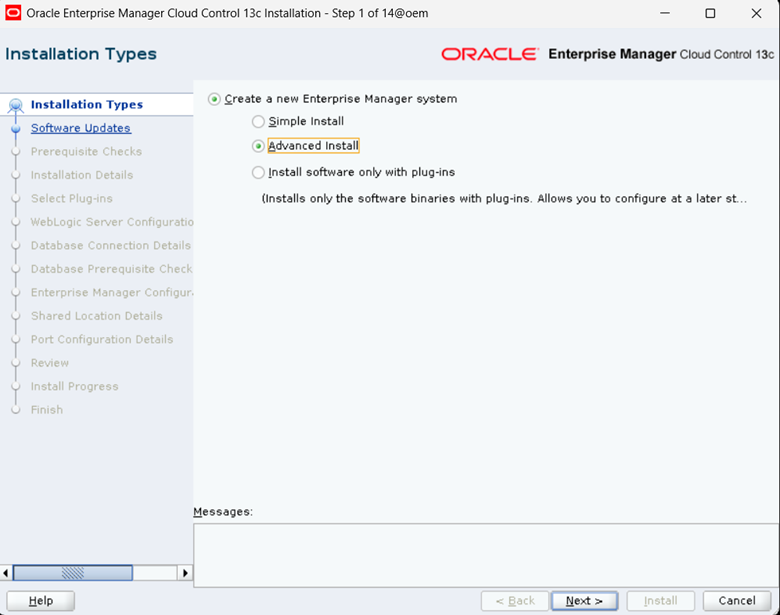
Select “Advanced Install” and click on Next
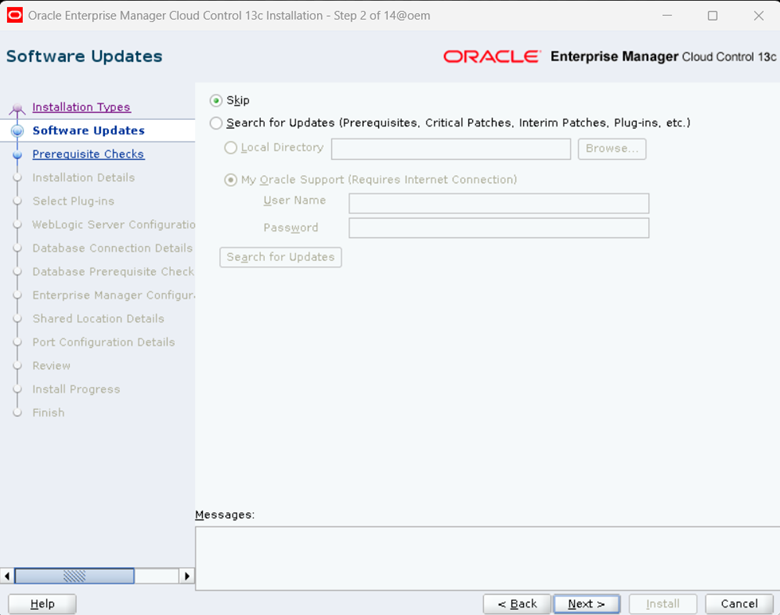
Select “Skip” and click on Next
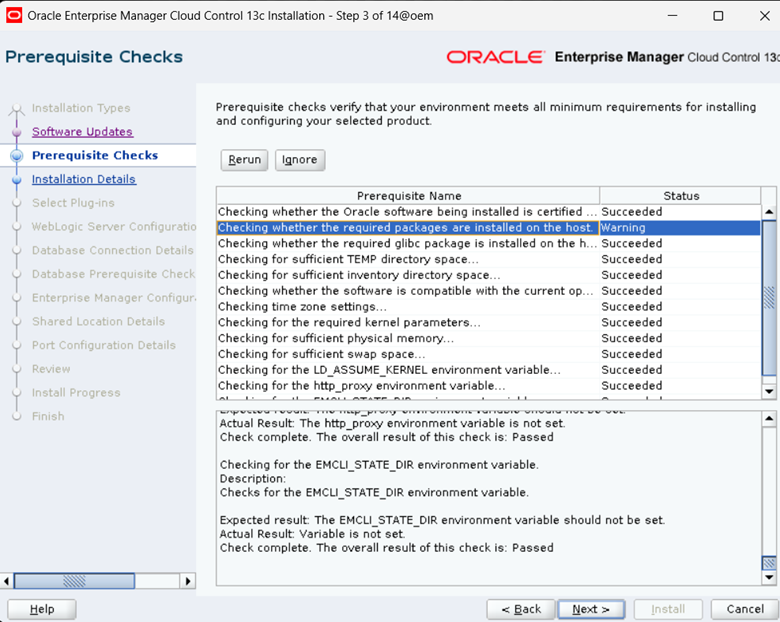
Click on “Ignore and then click on Next
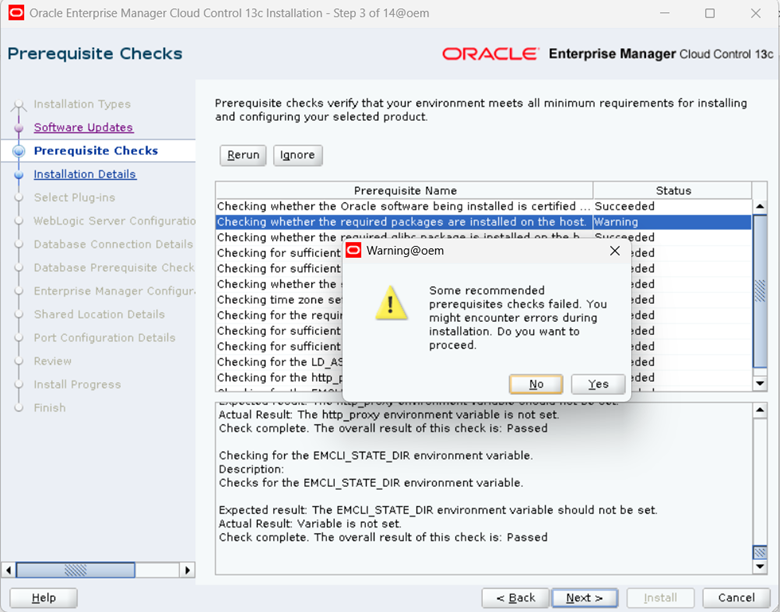
Click on Yes
Provide the Middleware, Agent Base directory and hostname details
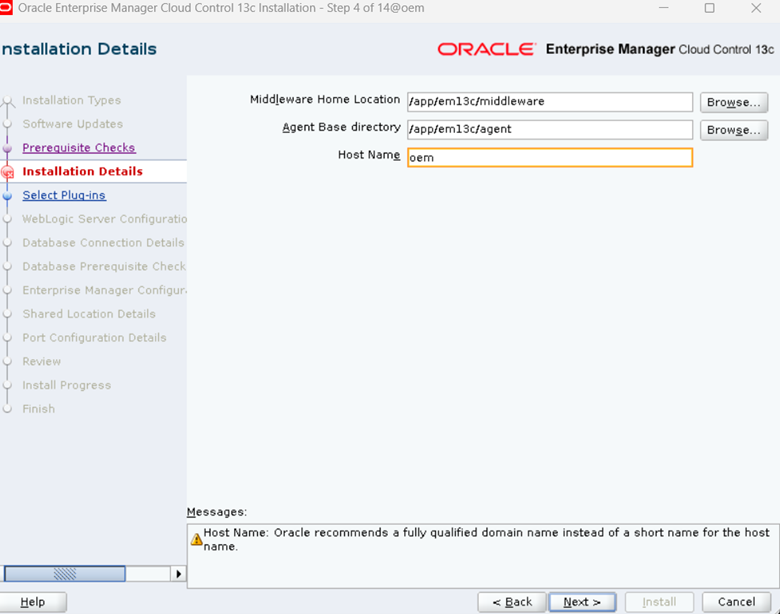
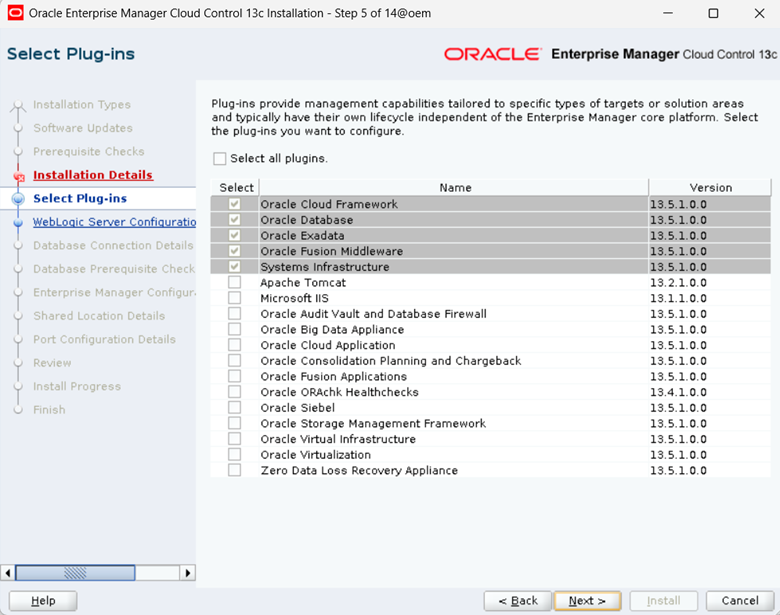
Installer automatically selects default plugins, click on Next
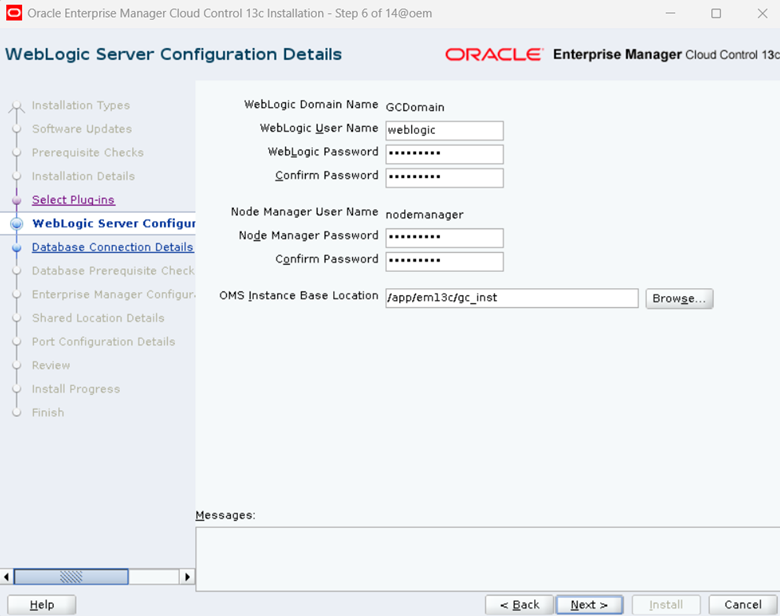
Provide the password for WebLogic User and Node Manager User
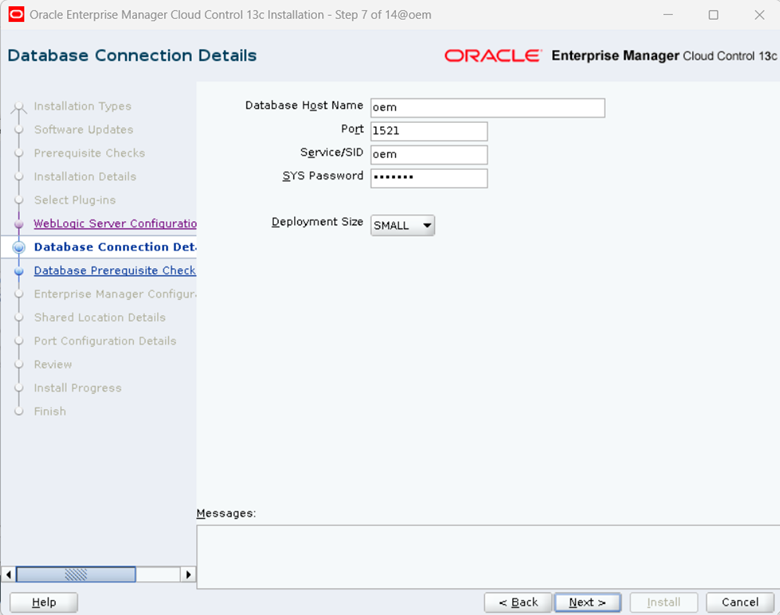
Provide database connection details
Click on “Auto Fix”
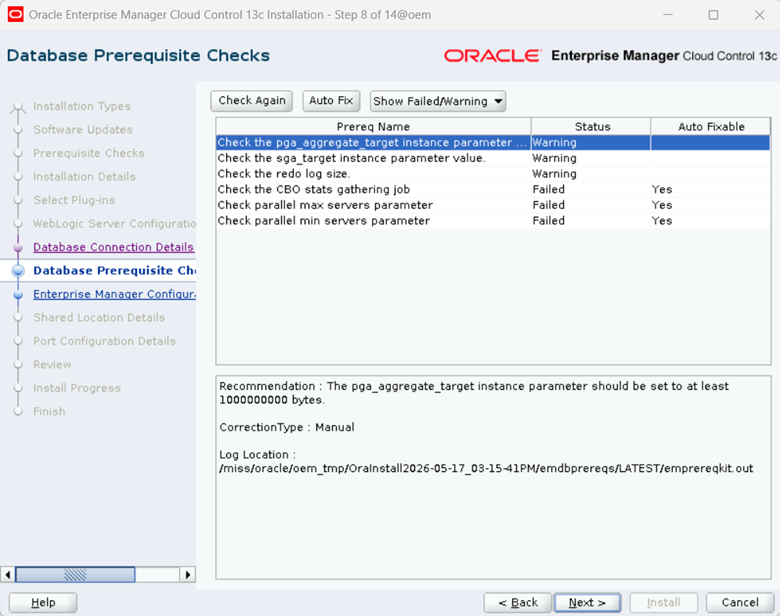
Click on Next
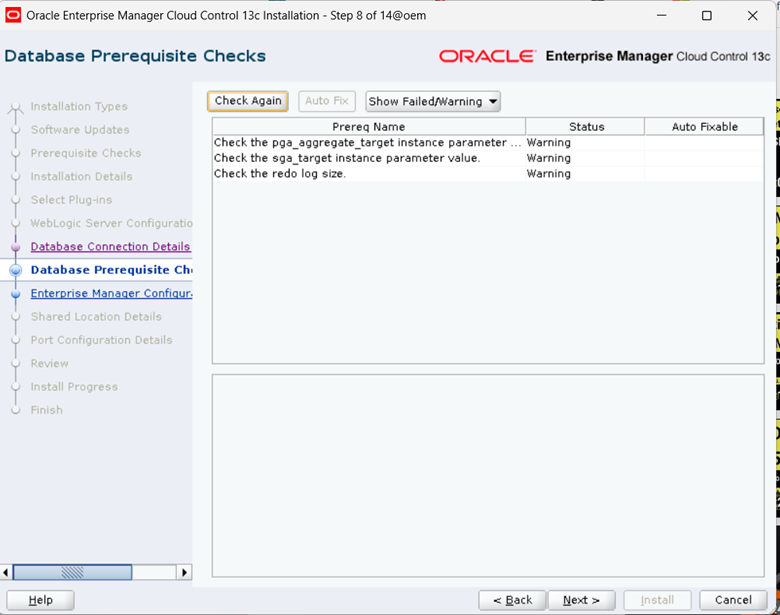
Ignore below warnings and click on Next.
Provide SYSMAN and Agent Registration password, click on Next
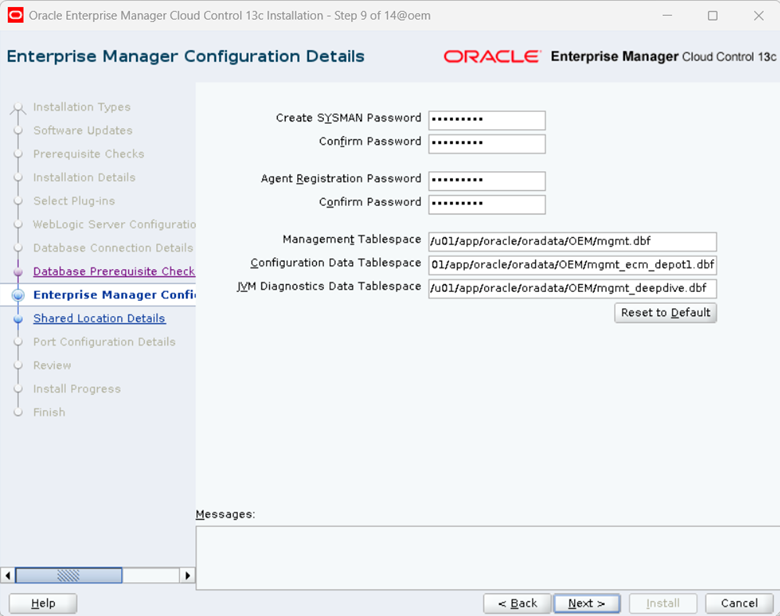
Click on Next
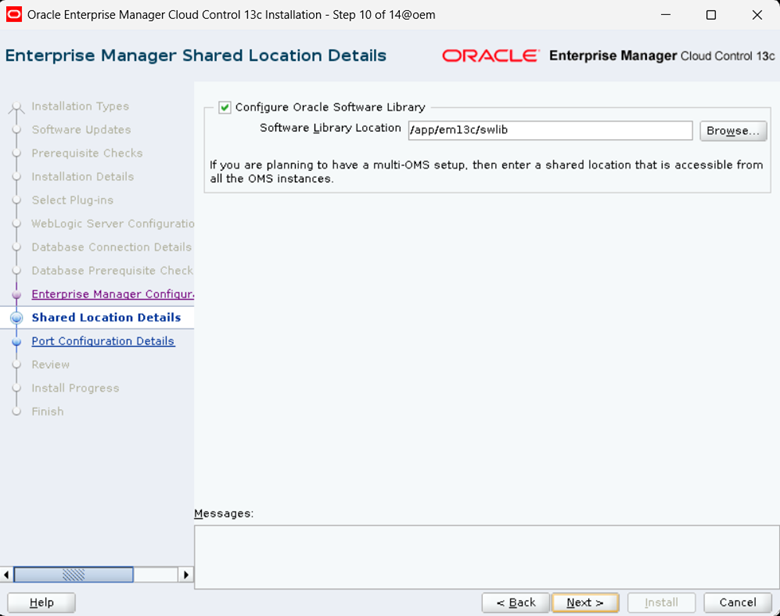
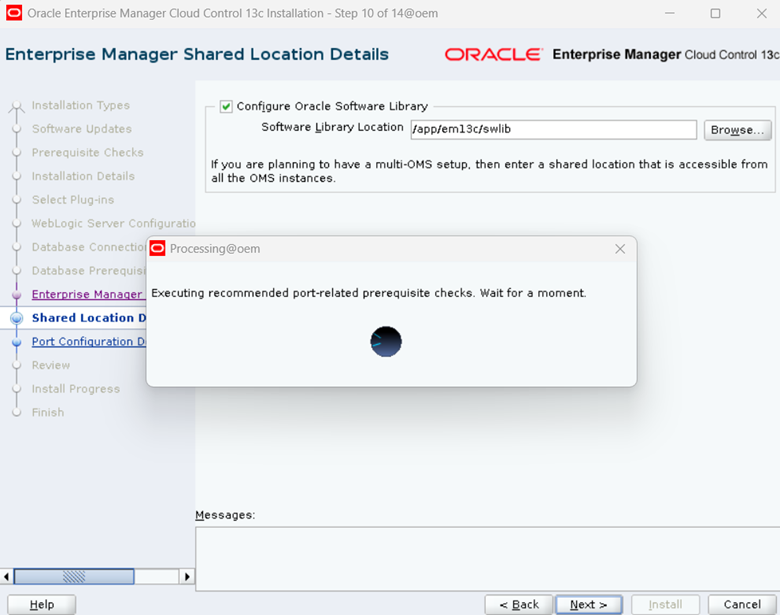
Click on Next
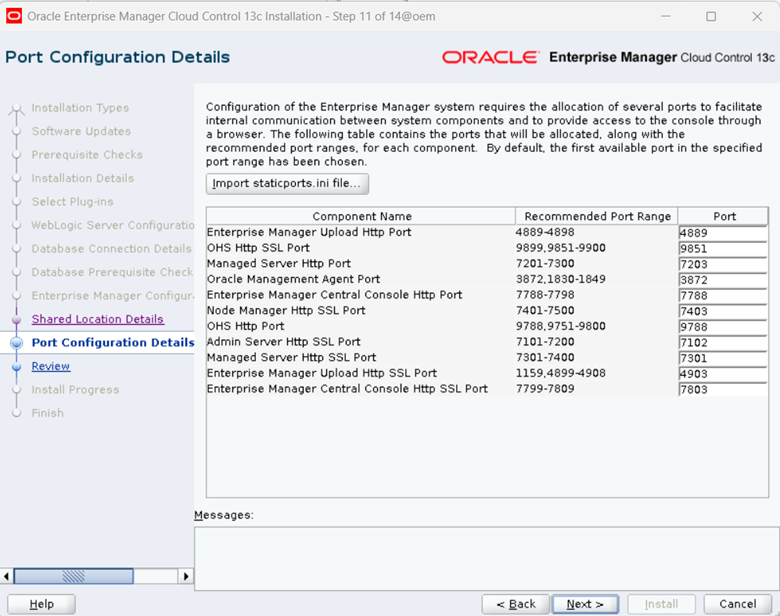
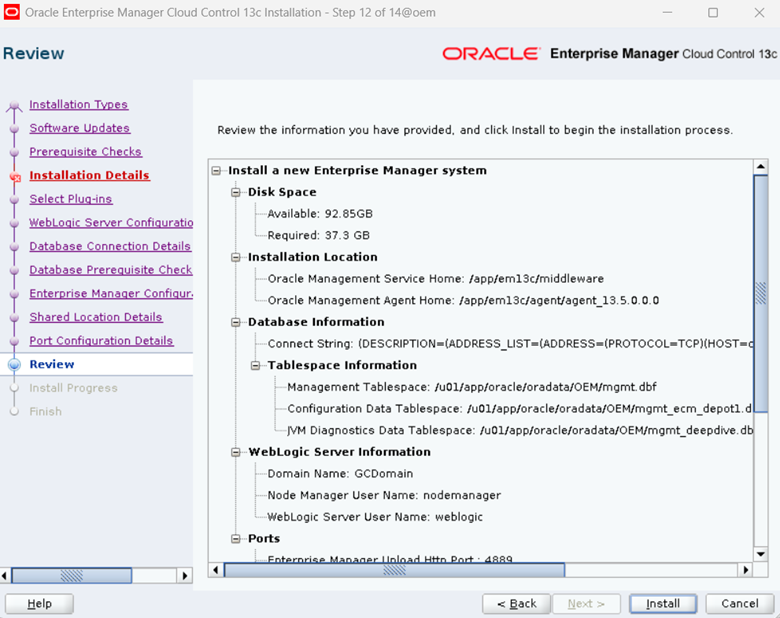
Click on Install
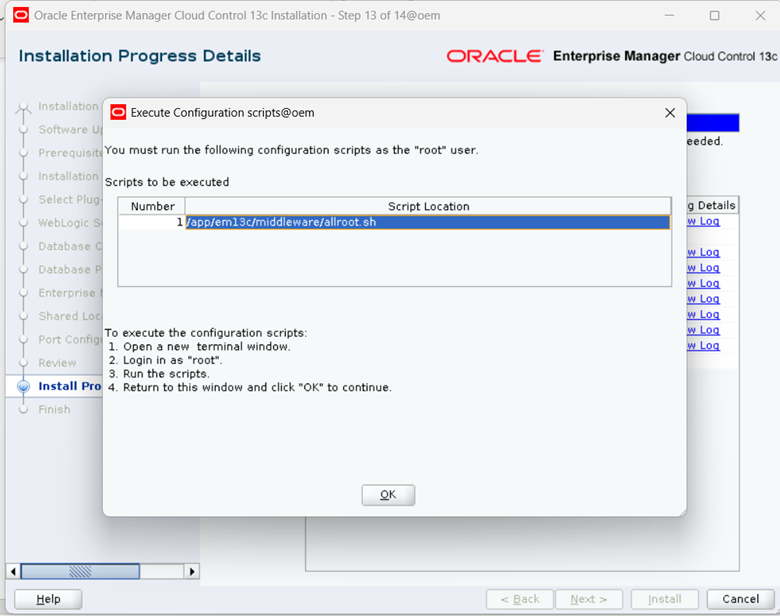
Execute the script as root user and clik on OK
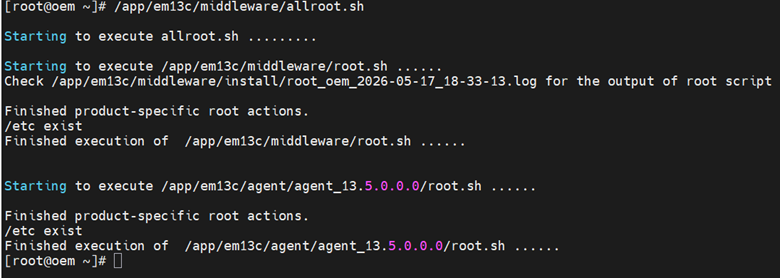
Click on Close
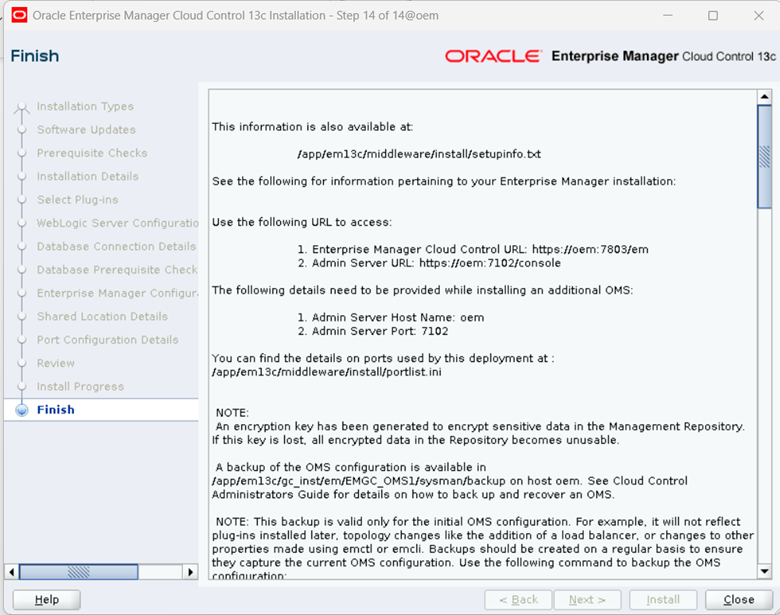
Installation of OEM is completed.
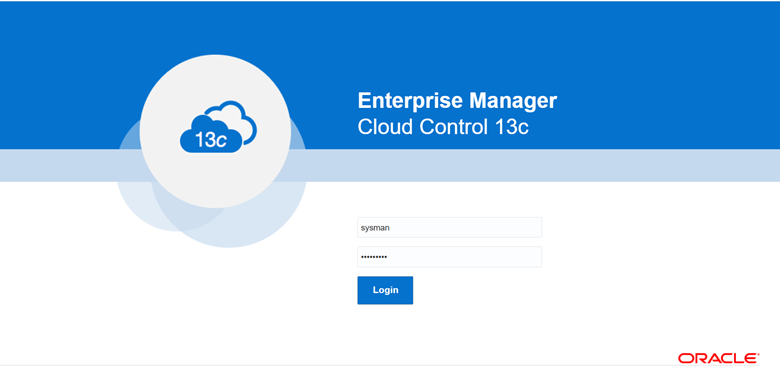
7. Login to OEM console.
Enter sysman user and password
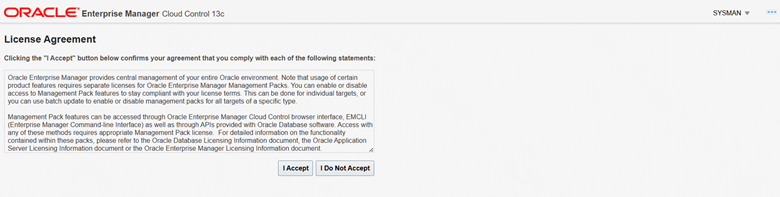
Click on I Accept
Click on Targets->Hosts
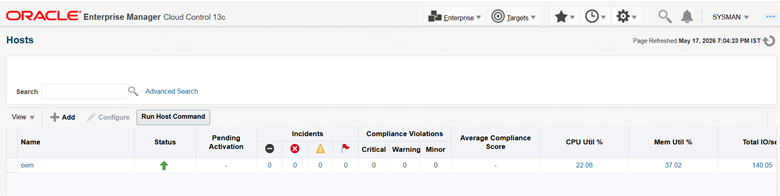
8. Check OMS status and Agne status.
[oracle@oem ~]$ cd /app/em13c/middleware/bin/
[oracle@oem bin]$ ./emctl status oms -details
Oracle Enterprise Manager Cloud Control 13c Release 5
Copyright (c) 1996, 2021 Oracle Corporation. All rights reserved.
Enter Enterprise Manager Root (SYSMAN) Password :
Console Server Host : oem
HTTP Console Port : 7788
HTTPS Console Port : 7803
HTTP Upload Port : 4889
HTTPS Upload Port : 4903
EM Instance Home : /app/em13c/gc_inst/em/EMGC_OMS1
OMS Log Directory Location : /app/em13c/gc_inst/em/EMGC_OMS1/sysman/log
OMS is not configured with SLB or virtual hostname
Agent Upload is locked.
OMS Console is locked.
Active CA ID: 1
Console URL: https://oem:7803/em
Upload URL: https://oem:4903/empbs/upload
WLS Domain Information
Domain Name : GCDomain
Admin Server Host : oem
Admin Server HTTPS Port: 7102
Admin Server is RUNNING
Oracle Management Server Information
Managed Server Instance Name: EMGC_OMS1
Oracle Management Server Instance Host: oem
WebTier is Up
Oracle Management Server is Up
JVMD Engine is Up
[oracle@oem ~]$ cd /app/em13c/agent/agent_13.5.0.0.0/bin/
[oracle@oem bin]$ ./emctl status agent
Oracle Enterprise Manager Cloud Control 13c Release 5
Copyright (c) 1996, 2021 Oracle Corporation. All rights reserved.
—————————————————————
Agent Version : 13.5.0.0.0
OMS Version : 13.5.0.0.0
Protocol Version : 12.1.0.1.0
Agent Home : /app/em13c/agent/agent_inst
Agent Log Directory : /app/em13c/agent/agent_inst/sysman/log
Agent Binaries : /app/em13c/agent/agent_13.5.0.0.0
Core JAR Location : /app/em13c/agent/agent_13.5.0.0.0/jlib
Agent Process ID : 311960
Parent Process ID : 311853
Agent URL : https://oem:3872/emd/main/
Local Agent URL in NAT : https://oem:3872/emd/main/
Repository URL : https://oem:4903/empbs/upload
Started at : 2026-05-17 18:31:24
Started by user : oracle
Operating System : Linux version 5.15.0-205.149.5.1.el9uek.x86_64 (amd64)
Number of Targets : 35
Last Reload : (none)
Last successful upload : 2026-05-17 19:05:26
Last attempted upload : 2026-05-17 19:05:26
Total Megabytes of XML files uploaded so far : 1.98
Number of XML files pending upload : 0
Size of XML files pending upload(MB) : 0
Available disk space on upload filesystem : 80.21%
Collection Status : Collections enabled
Heartbeat Status : Ok
Last attempted heartbeat to OMS : 2026-05-17 19:08:36
Last successful heartbeat to OMS : 2026-05-17 19:08:36
Next scheduled heartbeat to OMS : 2026-05-17 19:09:36
—————————————————————
Agent is Running and Ready
Disclaimer:
Please note the above information is only for educational purpose and practised in personal test database only. Always test in test database before implementing in production database. The pre-requisites and ways of implementing may vary from one environment to another. Hence, not providing guarantee that it will work in your environment.
